
Updated October 2026 for AlmaLinux 9, Ubuntu 24.04 and Debian 12.
We wrote this list in 2018, back when every command started with yum or chkconfig. This year we went through it tool by tool, fully expecting to bury one or two. Nobody died. atop, MySQLTuner, ss, grep and nc are all still maintained upstream, and they’re still the five we’d hand anyone who has to figure out why a Linux server is slow, flaky or just went down.
What changed is everything around them. CentOS 7 hit end of life in June 2024, init scripts turned into systemd units, and a couple of packages moved repos or changed names. So below you get each tool, why it earns its spot, and the commands that work today on AlmaLinux 9 (dnf) and on Ubuntu 24.04 or Debian 12 (apt).
| Tool | Question it answers | AlmaLinux 9 | Ubuntu 24.04 / Debian 12 | Upstream status |
|---|---|---|---|---|
| atop | What was eating the box at 3 a.m.? | atop (EPEL) | atop | Active; 2.13.0 released July 2026 |
| MySQLTuner | Is my MySQL or MariaDB config sane? | mysqltuner (EPEL) | mysqltuner (old on Debian 12) | Active; 2.9.2 released August 2026 |
| ss | What’s listening, and who’s connected? | iproute (installed) | iproute2 (installed) | Active, part of iproute2 |
| grep | Where is that string? | grep (installed) | grep (installed) | Active, GNU project |
| nc | Can I reach that port, and what does it say? | nmap-ncat | netcat-openbsd | Both active |
1. atop: the flight recorder
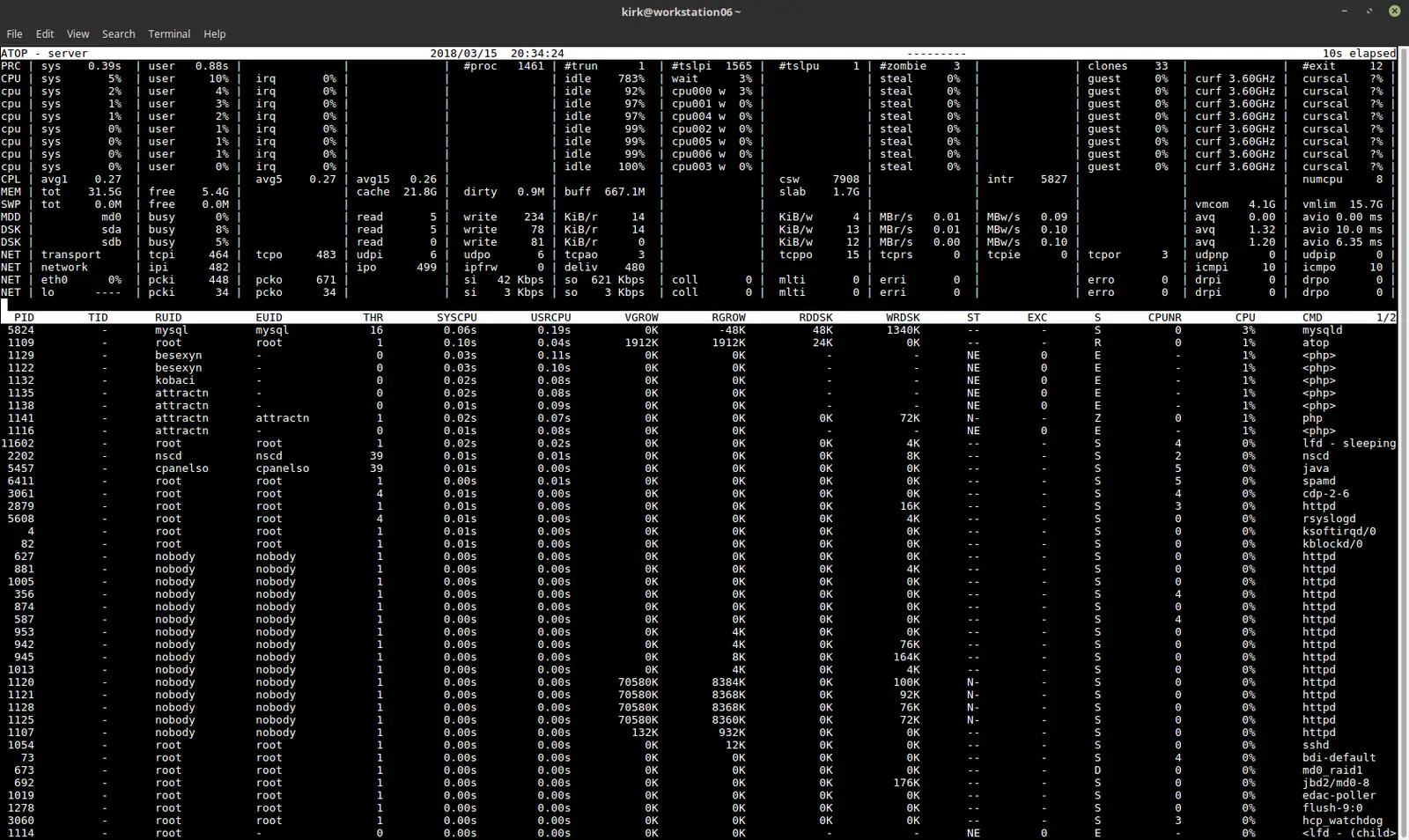
You know top. It tells you what’s happening right now, which is useless when the server fell over at 3:10 a.m. and you’re looking at it at 9. atop shows you the same live view with more detail, and it can also run as a service that writes snapshots to disk, so you can rewind to the minutes before the crash and see which process ate the memory.
In one screen you get:
- CPU usage overall and per process
- Load average
- Memory and swap, overall and per process
- Disk I/O per physical disk, and per LVM volume if you use LVM
- Network traffic per interface
- A process list you can sort by CPU, memory, disk or network
Installing atop
On AlmaLinux and Rocky, atop lives in EPEL. AlmaLinux’s docs say to enable CRB as well, because a lot of EPEL packages pull dependencies from it. Unlike the Debian package, the EPEL one doesn’t start the logging service for you.
# AlmaLinux 9 / Rocky 9
sudo dnf install epel-release
sudo dnf config-manager --set-enabled crb
sudo dnf install atop
sudo systemctl enable --now atop

# Ubuntu 24.04 / Debian 12 (on Ubuntu it's in the universe component)
sudo apt update
sudo apt install atop
systemctl status atop
On Debian and Ubuntu the package enables and starts atop.service on install. That last line just confirms it’s running.
Logging and playback
Out of the box, atop writes a sample every 600 seconds and keeps 28 days of daily files in /var/log/atop/, named atop_YYYYMMDD. Ten minutes is too coarse to catch a short spike. On a box that misbehaves, drop LOGINTERVAL to 60 and restart the service. The setting lives in /etc/default/atop on Debian and Ubuntu and in /etc/sysconfig/atop on AlmaLinux.
To replay a day:
# Today's log
atop -r

# Yesterday's log, starting at 03:00
atop -r y -b 0300

# A specific day
atop -r /var/log/atop/atop_20261001
Inside the replay, t steps forward one sample, T steps back, and b jumps to a time. Press m to sort by memory, d for disk. Most “the server just died” mysteries end right here, with one process whose memory column climbs for twenty minutes before the OOM killer shows up.
One version note: EPEL 9 still ships atop 2.7.1, while upstream is on 2.13.0. The commands above work on both.
2. MySQLTuner: a second opinion on my.cnf
MySQLTuner is a Perl script that reads your running MySQL, MariaDB or Percona server’s status counters and tells you which settings look wrong. It’s not magic. But it can turn a “we need a bigger server” conversation into a two-line config change, and it’s still under active development, with 2.9.2 released in August 2026.
What it reports:
- Peak memory used, and the maximum memory your current settings could use
- Slow query counts
- Connection usage against
max_connections - Table lock contention
- InnoDB buffer pool size and hit rate
- MyISAM key buffer stats, if you still have MyISAM tables
Installing and running it
# AlmaLinux 9 (EPEL, same setup as atop)
sudo dnf install mysqltuner
sudo mysqltuner

# Ubuntu 24.04
sudo apt install mysqltuner
sudo mysqltuner

# Any distro, latest upstream script (use this on Debian 12)
wget https://mysqltuner.pl/ -O mysqltuner.pl
wget https://raw.githubusercontent.com/major/MySQLTuner-perl/master/basic_passwords.txt -O basic_passwords.txt
wget https://raw.githubusercontent.com/major/MySQLTuner-perl/master/vulnerabilities.csv -O vulnerabilities.csv
sudo perl mysqltuner.pl
Debian 12’s package is version 1.9.9, which predates MySQL 8.4. Skip it and pull the script. The two extra files are optional; they feed the weak-password and CVE checks. If the script can’t log in on its own, give it credentials with --user and --pass, or point it at a client config with --defaults-file.
Don’t trust it blindly
Wait until MySQL has been up for at least 24 hours of normal traffic. Run it right after a restart and most of the stats are noise, which the project itself warns about.
Then treat each recommendation as a suggestion. The classic way to hurt yourself is to follow every “increase this buffer” line on a server that’s already short on RAM, and watch MySQL eat the memory your web server needed. After any change, run it again and look hard at the maximum possible memory figure. On a box that does nothing but MySQL, letting that sit near 90% of RAM can be fine. On a cPanel server running Apache, PHP and mail next to MySQL, it’s asking for the OOM killer, and the --nondedicated flag exists for exactly that kind of shared box.
Two more 2026 notes. If it suggests query cache settings, that only applies to MariaDB, because MySQL removed the query cache in 8.0. And the config file isn’t always /etc/my.cnf anymore: AlmaLinux uses /etc/my.cnf plus /etc/my.cnf.d/, and Debian and Ubuntu keep it under /etc/mysql/.
3. ss: what’s listening and who’s connected
ss ships in iproute2 and replaced netstat years ago. It’s faster on busy servers, and on a lot of current minimal installs netstat isn’t there at all. Don’t bother installing net-tools just to get it back. Learn these instead:
# Listening TCP and UDP sockets, numeric ports, with the owning process
sudo ss -tulpn

# Established TCP connections
ss -tn state established

# Connections to or from one remote address
ss -tn dst 203.0.113.10

# Summary counts by protocol and state
ss -s
The first one answers “is nginx really listening on 443, and on which address?” faster than anything else. If it shows 127.0.0.1:3306 and your app server is on another box, you’ve found your problem. The filter syntax in the third line saves you from piping into grep, though grep works fine too.
4. grep: still the fastest way through a log
Every box you’ll ever SSH into has grep. That’s why it stays on this list over faster alternatives like ripgrep, which is great on your own workstation and probably missing from the broken server in front of you.
The old version of this post piped cat into grep. Don’t. grep reads files directly, and Apache’s log paths differ by distro:
# AlmaLinux: Apache logs are in /var/log/httpd/
grep "index.html" /var/log/httpd/access_log

# Ubuntu / Debian: Apache logs are in /var/log/apache2/
grep "203.0.113.10" /var/log/apache2/access.log

# Count case-insensitive fixed-string matches (e.g. login brute force)
grep -Fic "wp-login.php" /var/log/apache2/access.log

# Search rotated logs too, gzipped or not
zgrep "203.0.113.10" /var/log/apache2/access.log*

# Find which config file sets something, with file names and line numbers
grep -rn "DB_HOST" /var/www/
A lot of logs now live in the systemd journal instead of text files. journalctl has its own grep built in, so journalctl -u nginx --since "1 hour ago" -g "error" does the filtering for you.
5. nc: talk to a port directly
nc opens a raw TCP connection and lets you type at whatever’s on the other end. It’s the quickest way to tell “the firewall is blocking it” apart from “the service is up but returning garbage.”
The package depends on the distro. AlmaLinux’s nc is Nmap’s ncat. Debian and Ubuntu use the OpenBSD netcat. The flags below work on both.
# AlmaLinux 9
sudo dnf install nmap-ncat

# Ubuntu 24.04 / Debian 12
sudo apt install netcat-openbsd

# Is the port open? -z connects and closes, -v reports what happened
nc -zv db1.example.com 3306
Testing HTTP
The original post sent a bare GET /. That’s an HTTP/0.9-style request with no Host header, so on any server hosting more than one site you get the default vhost, not the one you meant. Send a real HTTP/1.1 request instead:
printf 'HEAD / HTTP/1.1\r\nHost: www.example.com\r\nConnection: close\r\n\r\n' | nc www.example.com 80For day-to-day HTTP checks, curl -v is easier. Reach for nc when you want to see exactly what goes over the wire, or when the protocol isn’t HTTP.
Testing SMTP
SMTP wants CRLF line endings, so use -C. Blocklist operators sometimes ask for exactly this kind of transcript when you’re trying to get delisted.
nc -C mail.example.com 25
EHLO test.example.com
MAIL FROM:<sender@example.com>
RCPT TO:<recipient@example.com>
DATA
Subject: test

This is a test message.
.
QUIT
The old version skipped EHLO and DATA. Real mail servers will reject you without them.
TLS services
Plain nc is for plain-text ports. For anything behind TLS, use OpenSSL’s client, available on all of these distros, then type protocol commands exactly as you would with nc:
# HTTPS
openssl s_client -connect www.example.com:443

# SMTP submission with STARTTLS
openssl s_client -starttls smtp -connect mail.example.com:587 -crlf
On AlmaLinux, ncat can do it too: ncat -C --ssl www.example.com 443.
Honorable mentions
Five more that didn’t make the cut but are worth installing on day one:
- btop is the nicest live view of CPU, memory, disk and network you’ll find in a terminal. It has no history, so it complements atop rather than replacing it. EPEL on AlmaLinux,
apt install btopon Ubuntu and Debian. - mtr combines ping and traceroute and keeps updating. Run it before you open any “the network is slow” ticket, with your ISP or with us.
dnf install mtrorapt install mtr-tiny. - ncdu answers “what filled the disk?” in about ten seconds. EPEL on AlmaLinux,
apt install ncduelsewhere. - tcpdump is for when nc says the connection works and the app swears it doesn’t.
dnf install tcpdumporapt install tcpdump. - journalctl is already installed.
journalctl -b -1 -p errshows errors from the previous boot, as long as the journal is persistent (/var/log/journal/exists).
None of these replace knowing your own stack. They just make the 3 a.m. version of you faster. And if you’d rather not be the one replaying atop logs at 3 a.m., our managed servers come with our engineers handling patching, monitoring and troubleshooting.

